
SMS Alert Notifications
Last updated: 2026-05-01
OhioIoT offers an optional SMS text-message alert feature for account holders. This page describes how to opt in, what messages we send, and how to opt out. SMS alerts are transactional only — we use them to notify you when an alert rule you have defined within the platform is triggered. We do not use SMS for marketing or promotions.
Who this is for
SMS alerts are available only to OhioIoT account holders who have configured one or more alert rules on their devices. Opt-in happens after you create an account and log in to the platform; there is no public-facing form that collects phone numbers.
How opt-in works
The opt-in flow takes place inside the logged-in application:
- Create an account and log in.
- Navigate to Settings.
- Enter your mobile number in the Default Alerts Phone Number field.
- As soon as a phone number is entered, the SMS Alert Policy panel appears below the field, displaying the full text of this policy.
- Beneath the policy is the consent checkbox: "I have read and agree to the SMS alert opt-in and opt-out policy." The Save button remains disabled and a warning ("You must accept the SMS policy before saving your phone number") is shown until the box is checked.
- Once you check the box and save, your number is associated with your account. From that point on, you will receive a text message any time an alert rule you have defined fires.
- If you ever clear the phone-number field, your consent is automatically reset and you will no longer receive any messages.
Visual walkthrough of the in-app opt-in

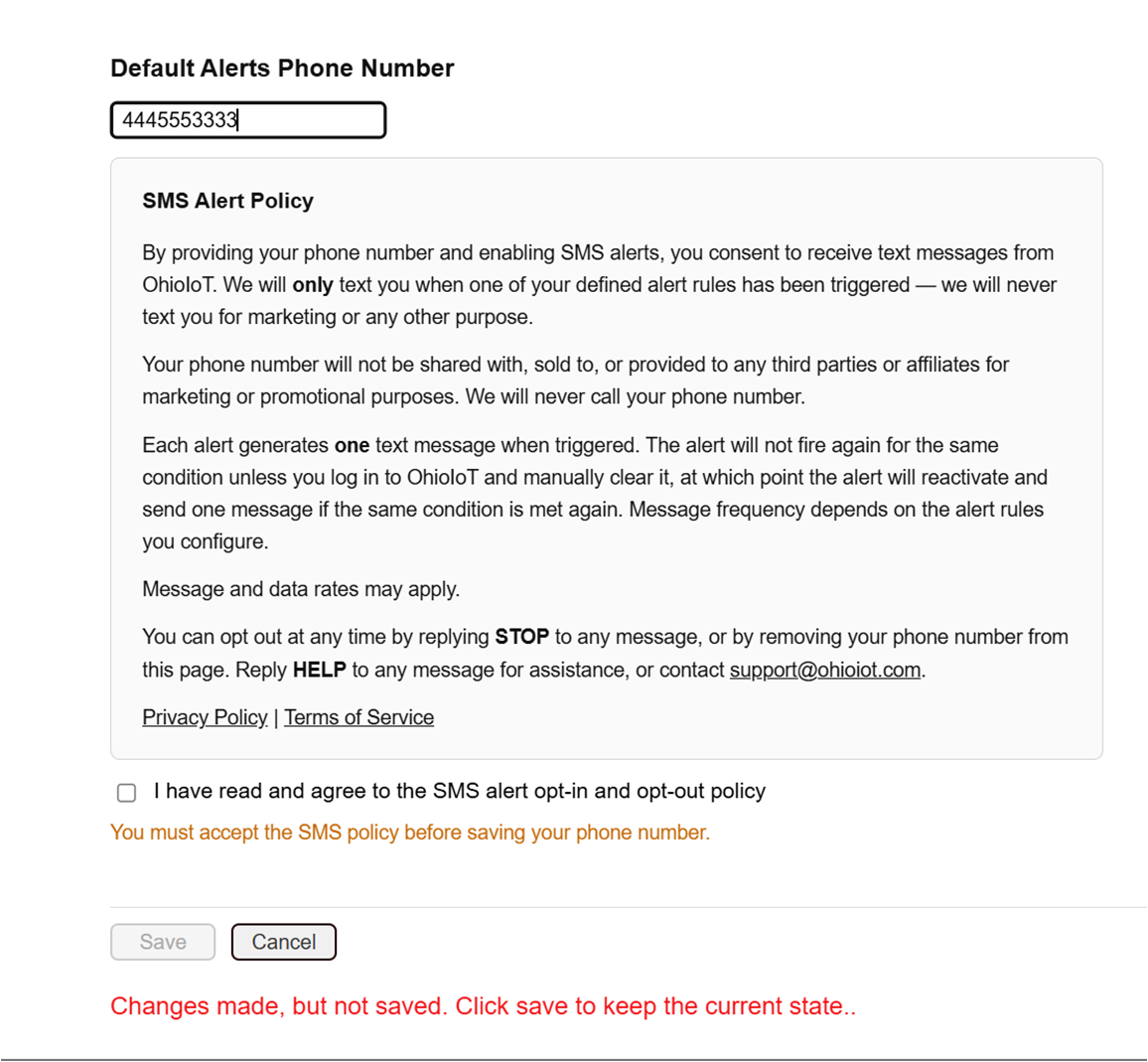
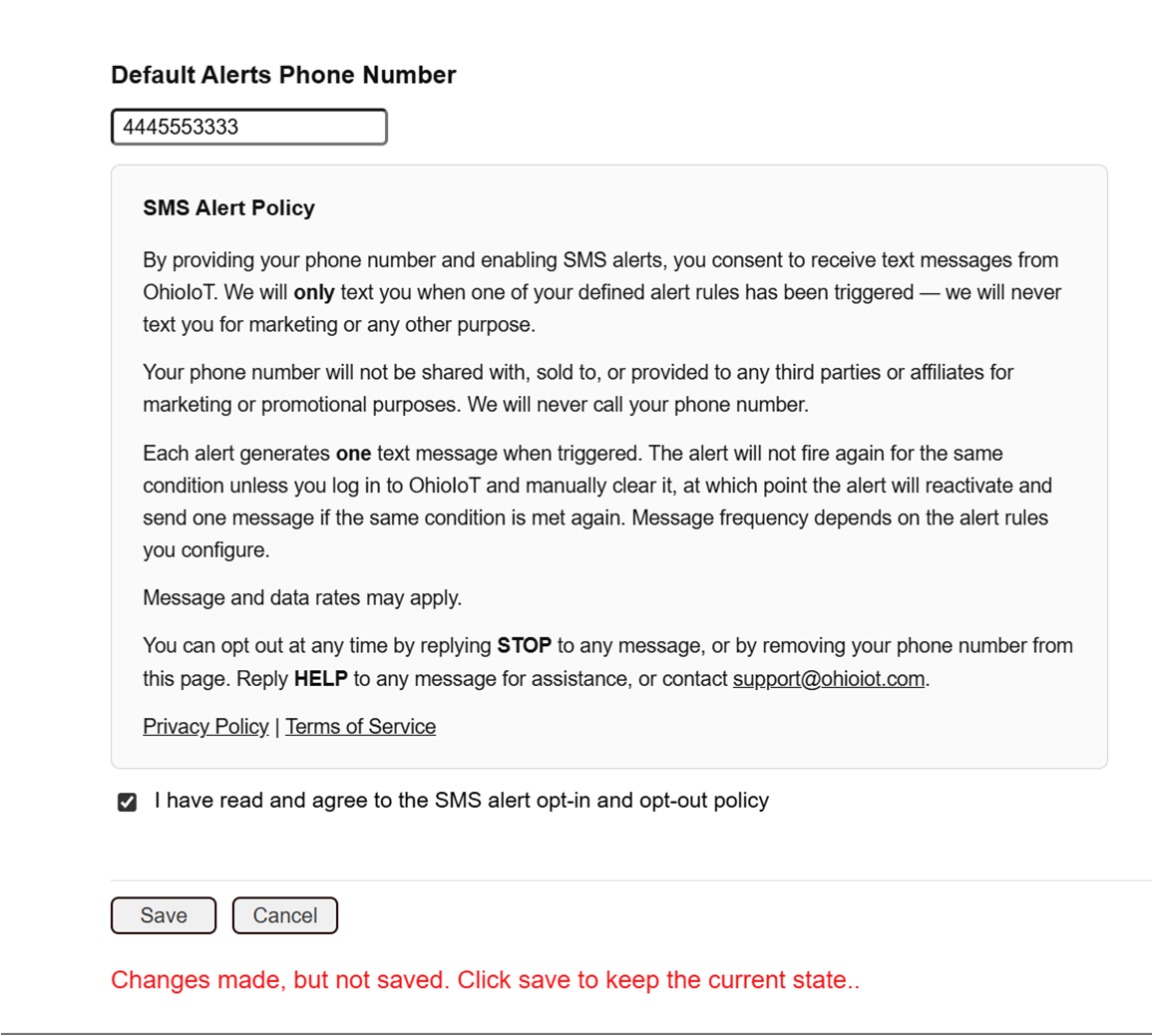
The full SMS Alert Policy (as shown in the app)
By providing your phone number and enabling SMS alerts, you consent to receive text messages from OhioIoT. We will only text you when one of your defined alert rules has been triggered — we will never text you for marketing or any other purpose.
Your phone number will not be shared with, sold to, or provided to any third parties or affiliates for marketing or promotional purposes. We will never call your phone number.
Each alert generates one text message when triggered. The alert will not fire again for the same condition unless you log in to OhioIoT and manually clear it, at which point the alert will reactivate and send one message if the same condition is met again. Message frequency depends on the alert rules you configure.
Message and data rates may apply.
You can opt out at any time by replying STOP to any message, or by removing your phone number from the Settings page. Reply HELP to any message for assistance, or contact [email protected].
Sample message
OhioIoT alert: rule "Greenhouse Temp High" triggered at 2026-05-01 14:32.
Reply STOP to unsubscribe, HELP for help.
Frequency, rates, and carriers
Message frequency depends entirely on the alert rules you configure — there is no fixed schedule. Message and data rates may apply. SMS delivery may vary by carrier; OhioIoT is not responsible for delayed or undelivered messages caused by carrier issues.
How to opt out
- Reply STOP to any alert message.
- Or remove your phone number from the Settings page in your account.
- Or delete the underlying alert rule.
Reply HELP to any message for assistance, or email [email protected].
What we will not do
- We will not share, sell, or provide your phone number or SMS opt-in data to any third parties or affiliates for marketing or promotional purposes.
- We will never call your phone number.
- We will not send marketing messages, newsletters, or anything other than the alerts you configured.